


Holy Spirit Rambling Group
Using a GPS
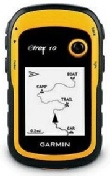 Garmin eTrex10 (although most Garmins work the same way).
With this GPS I save the route file from Tracklogs to my GPS. Windows sees the GPS as a Mass Storage device. Before you set out don't forget to reset the Trip Data in the Trip Computer.
N.B. The following instructions are for following a ROUTE- a series of Waypoints connected together to form a Route, as apposed to following a TRACK.
In following a Route you will need to set the distance that you pass near to a Waypoint for the GPS to record you having past it. To set the radius of this circle up on the GPS go into 'Setup', 'Routing', 'Off Road Transitions' and set the distance, I usually set this to about 25 metres. If you don't set this and leave it at zero the GPS will not see you having passed the waypoint unless you pass at EXACTLY the same point as set in the GPS for the waypoint.
In the field I navigate using the Compass on the GPS.
Please remember, if the compass
arrow is undecided the ‘Bearing’ shown is correct. Check with a compass such as a
Sllva.
You can alter the data viewable at each window on all the various functions on this GPS. On the Compass function I set the data windows to show- 'Bearing', 'Dist to Next', 'Next Point', 'Location' and the Compass. Note that if you stand still the compass arrow will not know which way to point and will dance around all over the place. Whilst this might be disconcerting, the 'Bearing' given is correct. In this case just set your magnetic compass (Silva or similar) to this bearing. The compass on the GPS works by comparing two points as you move and so works out which way the arrow should point. If you are stationary there is only one point and so cannot determine which way the arrow should point.
If you have passed a Waypoint and are outside the circle whose radius you set in 'Off Road Transitions' the GPS will continue to try and take you back to it. The way around this is to go back to 'Where To?' and re-choose to follow this route. The GPS will then pick the route up from where you are.
Hope this helps.
Happy Rambling